

How to Track AI Costs in 2026
 John Baker
•
Mar 10, 2026
•
9 min read
John Baker
•
Mar 10, 2026
•
9 min read
AI spending is growing fast and getting hard to control. Here's how to track AI costs across your stack in 2026, from manual methods to automated platforms.
Ask about this article
Opens Claude in a new tab to answer, using this article as the source.
Most SaaS costs fit a predictable pattern. You sign a contract, assign seats, pay the invoice. But AI spending doesn't always work that way. Hidden behind seemingly low costs (only $20 for Claude/month!) are usage caps, often with little warning when your allocated usage tips into incremental PAYG token-based costs.
Then you have shadow AI usage and tool overlap, leading to cost optimization questions like, "We use Google Workspace, which has Gemini built in. Why also pay for ChatGPT?" or "Why are we paying so much for Cursor when we could just use Claude Code instead?"
The good news: it's possible to track AI costs in 2026 down to the cent, as well as easily identify overlapping AI tools. This guide breaks down how to track AI costs in 2026: what to measure, how to do it manually, and how platforms like Torii give you a real-time view across your entire AI stack.
Why is AI Spending Harder to Control Than SaaS?
Traditional SaaS follows a predictable model: pay $X per month, or per seat per month. In either model, predicting costs is easy (it'll be the same cost unless you add more people). AI tools have upended this with their focus on 'token-based' pricing and generally opaque insights into usage.
Usage-based pricing is of course not new. Tools like Stripe (commission %), Twilio (PAYG usage), and Hubspot (cost per marketing contact) have used them for years. Not to mention Google Cloud and AWS's cloud compute costs. But these are much more predictable than AI token pricing, and the norm for SaaS is still monthly/yearly pre-set commitments.
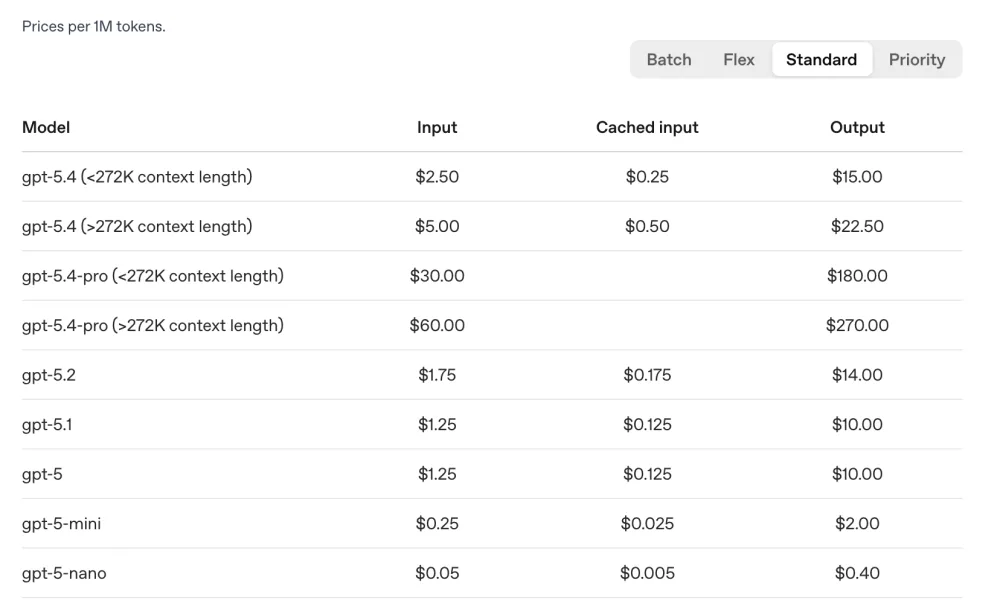
Meanwhile, AI tool usage is...confusing? Odd? Misleading? Just take a look at this API pricing breakdown from OpenAI.
Understanding costs here is a nightmare. What model are you using? Are we caching or not? Is this batch, flex, or standard? How do I track how many tokens any given message contains? At least with standard request-based PAYG pricing you know that 1 request = 1 request to pay for.
On top of that, you have shadow AI. Employees are signing up for their favorite new AI tools, even though they may overlap significantly with tools your company already pays for. Then, of course, people may be signing up for ChatGPT themselves when a team plan would be much more economical.
The costs can compound quickly. A 100-person engineering team could be running Cursor, GitHub Copilot, and Claude Code simultaneously, each doing roughly the same thing. At standard pricing, that's anywhere from $70,000 to $130,000 per year in coding AI alone.
This differs from traditional SaaS because normally it's easy to identify overlaps. If you're working with Box.com, it may feel weird to also work in Dropbox for some projects, since they are effectively the same tool. Gemini and MidJourney, on the other hand, may not feel that way. Yet, with the speed of AI innovation, the difference between AI tools is shrinking. Maybe you paid for Gemini Nano Banana because it was the best image generator, then switched to MidJourney the next month because it seemed better, and so on - until you just decide to keep paying for both. (Or, you were using MidJourney not knowing Gemini was also a great image generator).
The math adds up fast:
A 100-person dev team paying for Cursor ($48K/year), Copilot ($46.8K/year), and ChatGPT Team ($36K/year) could be spending over $130K annually on tools with significant feature overlap.
How Do I Track AI Costs Manually?
The manual approach to AI cost tracking is where most companies begin. For small companies, it's relatively simple: you log into each tool's billing dashboard separately (the OpenAI usage page, the Copilot admin console, Cursor Teams billing), pull the numbers, and paste them into a spreadsheet. Then you cross-reference expense reports to catch anything employees bought on their own.
This approach works passably when you have two or three tools and one person keeping the spreadsheet current. It doesn't hold up as your AI stack grows.
The core limitation with manual tracking comes down to visibility lag between spending and awareness. Each billing dashboard gives you a static snapshot from a single vendor. You have no cross-tool view of what an individual employee is spending across their whole AI stack. You can't see that one developer has active subscriptions to Cursor, Claude Pro, and ChatGPT running at the same time.
A second blind spot with manual tracking is that it tells you nothing about license utilization. A billing dashboard shows what you're paying, not what's being used. You can have 50 Copilot seats and only 20 active users, and the invoice looks the same regardless. Finding that waste requires comparing the bill against actual login data, which most AI tool billing dashboards don't surface.
Where manual tracking breaks down:
Expense reimbursements are often the first time IT learns about a new AI tool, and it may take months before IT even notices. By the time you notice the charge, the subscription has been running for weeks.
How Can I Track Costs with Torii?
Torii is an AI Management Platform that replaces the per-tool billing dashboard approach with a single consolidated view. Torii's AI Apps Spend dashboard pulls all your AI tool costs into one place: total spend by tool, last 30 days vs. last 12 months, user counts, and license utilization.
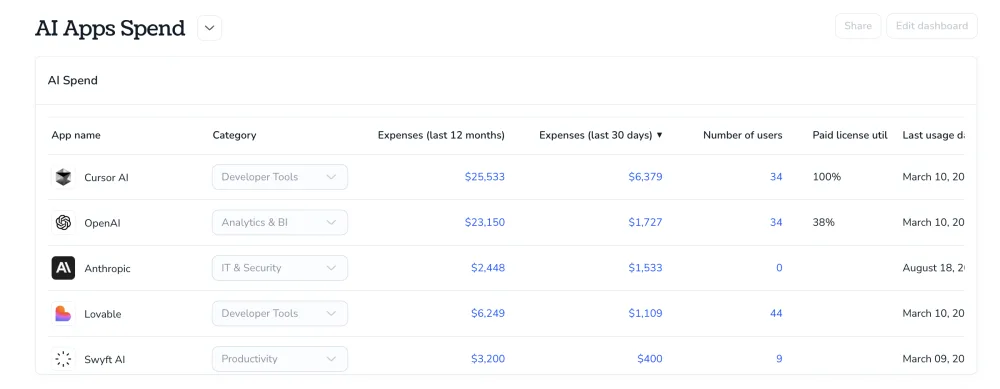
That last column is where the real value shows up. If Lovable is sitting at 38% license utilization, that means 62% of the seats you're paying for aren't actively used. That's not easily visible within Lovable alone. In Torii, it surfaces right next to the cost number so you can act on it immediately.
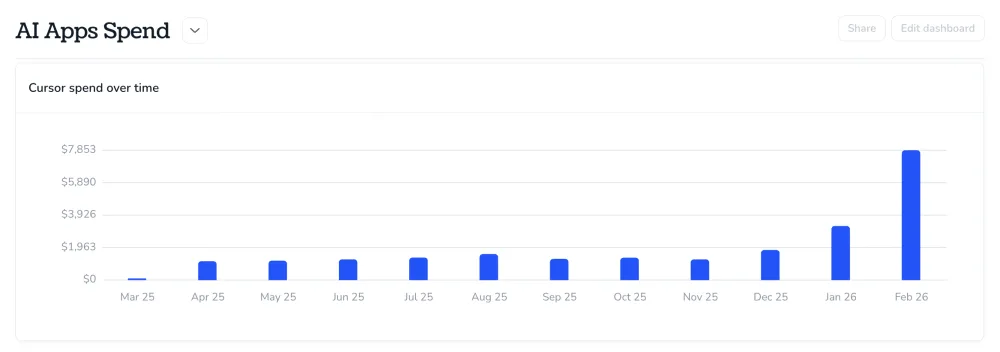
Additionally, the spend-over-time chart surfaces growth trends that a manual spreadsheet would never flag in time. Cursor spend jumping from roughly $1,400 per month to over $5,400 in two months is a signal worth investigating: is the team growing, or are a handful of power users burning through credits on a premium model? Seeing the trend is the first step to asking the right question.
What Torii surfaces that billing pages don't:
License utilization by tool, spend trends over time, and cross-tool cost comparisons in one view, without logging into a single vendor dashboard.
How Do I Cut My AI Costs?
Seeing your AI spend is the starting point, not the finish line. Once you have a consolidated view, four actions consistently move the number down.
Reclaim idle seats. For AI tools with seat-based pricing, any AI license that hasn't been accessed in 90 days is waste. License reclamation at this threshold can cut AI tool costs by 20-35% in organizations that haven't been actively managing it. Set a policy, automate the reclaim, and redirect those seat costs elsewhere.
Identify tool overlap. Once you can see every AI tool in use, consolidation decisions become obvious. If multiple teams are each paying for a coding assistant, pick one standard. If you have three separate LLM subscriptions doing similar work, consolidate. A tool like Torii can help surface those duplicate tools easily.
Rightsize tiers. Actual usage data removes the guesswork from tier and contract decisions. If 60% of your Copilot users are only accessing basic features, downgrade those seats. Annual contracts save 10-20% over monthly billing for tools you're committed to keeping long-term.
Set ongoing guardrails. Treat AI spend like cloud compute: allocated per team, monitored monthly, with budget alerts at 80% of the limit. Require new AI tool requests to pass a lightweight approval that checks for overlap with existing tools. The goal isn't to slow down adoption. It's to stop paying for the same capability twice.
Monitor outliers. If a certain tool or user is causing costs to climb, why is that? Perhaps there is wayward automation running, or an expensive model is being used when a more cost-efficient one would suffice. Review and set guidelines on model and token usage.
Quick wins after your first AI spend audit:
Reclaim seats inactive for 90+ days, consolidate overlapping coding AI tools, and set monthly budget alerts per team. These three steps alone can recover 20-35% of AI spend without cutting tools people actually use.
AI tool adoption isn't slowing down, and neither is the spending that comes with it. Enterprise AI-native app spend grew 108% year-over-year in 2025, and with more tools hitting the market every month, the overlap problem will only compound. The companies that stay ahead of it are the ones that treat AI spend the same way they treat cloud compute: tracked by team, reviewed regularly, and tied to actual outcomes.
The path forward isn't complicated. Know what you have, know what's being used, and build a repeatable process to act on that data. Whether you start with a manual audit or a platform like Torii that consolidates everything into one view, the goal is the same: visibility that lets you make decisions before you get surprised by a five-figure invoice.
See how Torii tracks your AI spend across every tool. Book a demo.
Related reading:
Frequently Asked Questions
The most effective approach is a SaaS management platform that consolidates spend from all your AI tools into one view. Without that, you're logging into each vendor's billing dashboard separately and manually aggregating the data, which creates gaps and blind spots. Torii's AI Apps Spend dashboard pulls costs, user counts, and license utilization into a single view across your entire AI stack.
Subscription costs tell you what you're committed to paying, while token usage tells you what you actually consumed. For seat-based tools like Cursor or Copilot, the key signal is whether those seats are active. For API-based tools where you're building on a model directly, you need to track input and output tokens by user, team, and feature to understand which workflows are driving costs.
Start with license reclamation: any seat inactive for 90+ days is pure waste and safe to reclaim. Then look for tool overlap, particularly in coding AI, where teams often run multiple assistants simultaneously. Rightsizing tiers based on actual usage data and consolidating to fewer vendors can save 20-40% without removing tools that engineers and teams depend on daily.
Shadow AI refers to AI tools employees sign up for and use without IT approval, often expensing them or paying out of pocket. Gartner data shows 68% of employees use unauthorized AI tools, which means a significant portion of your company's actual AI spend may not appear in any official software inventory. Catching it requires reviewing expense reports and credit card statements, not just your IT asset register.
Torii connects to your financial systems and SaaS stack to surface all AI tool spend in one dashboard. It shows total costs per tool, trends over time, active user counts, and license utilization rates. The utilization data is particularly useful for identifying waste: a tool at 38% license utilization means you may be paying for seats that aren't being used, which Torii surfaces so you can reclaim them.