

How to Get License Management and Cost Savings Recommendations Automatically in Torii
 Chris Shuptrine
•
Apr 5, 2023
•
6 min read
•
Updated October 12, 2026

Get usage-based license recommendations in Torii: reclaim unused seats, downgrade underused tiers, and optimize SaaS licenses before renewals.
Ask about this article
Opens Claude in a new tab to answer, using this article as the source.
Adopting SaaS applications is essential for any company. But, unfortunately, so is adopting their costly subscriptions.
With each company managing hundreds of SaaS apps, manually optimizing every license and subscription leads to expensive oversights like unused apps, underutilized and abandoned licenses, redundant tech, and overpriced subscriptions.
That’s why Torii’s complete SaaS management platform makes maximizing your SaaS ROI a breeze with actionable recommended actions for significant license management and cost savings.
This, plus Torii's advanced discovery, automation, and renewal management capabilities, empowers your organization to manage the entire SaaS lifecycle competently and confidently.
How Torii Turns Usage Data into License Recommendations
Torii is designed to serve as your SaaS System of Record. After connecting your applications to Torii, you’ll have an always up-to-date and granular view of their:
- Costs
- Users
- Licenses
- Usage insights
- Contract details
- And so much more
And all that data is put to use for you. Rather than simply sitting in a repository, Torii normalizes and categorizes each data point via our advanced data engine. Once that raw data is converted to atomized building blocks—it’s time to build something valuable!
With this standardized data set, Torii starts combing through your apps, looking for license management opportunities and cost savings.
Those massive ROI opportunities are then unified within your (aptly named) “Recommendations” tab.
From this view, you can quickly visualize each cost-saving action and its associated impact per application.
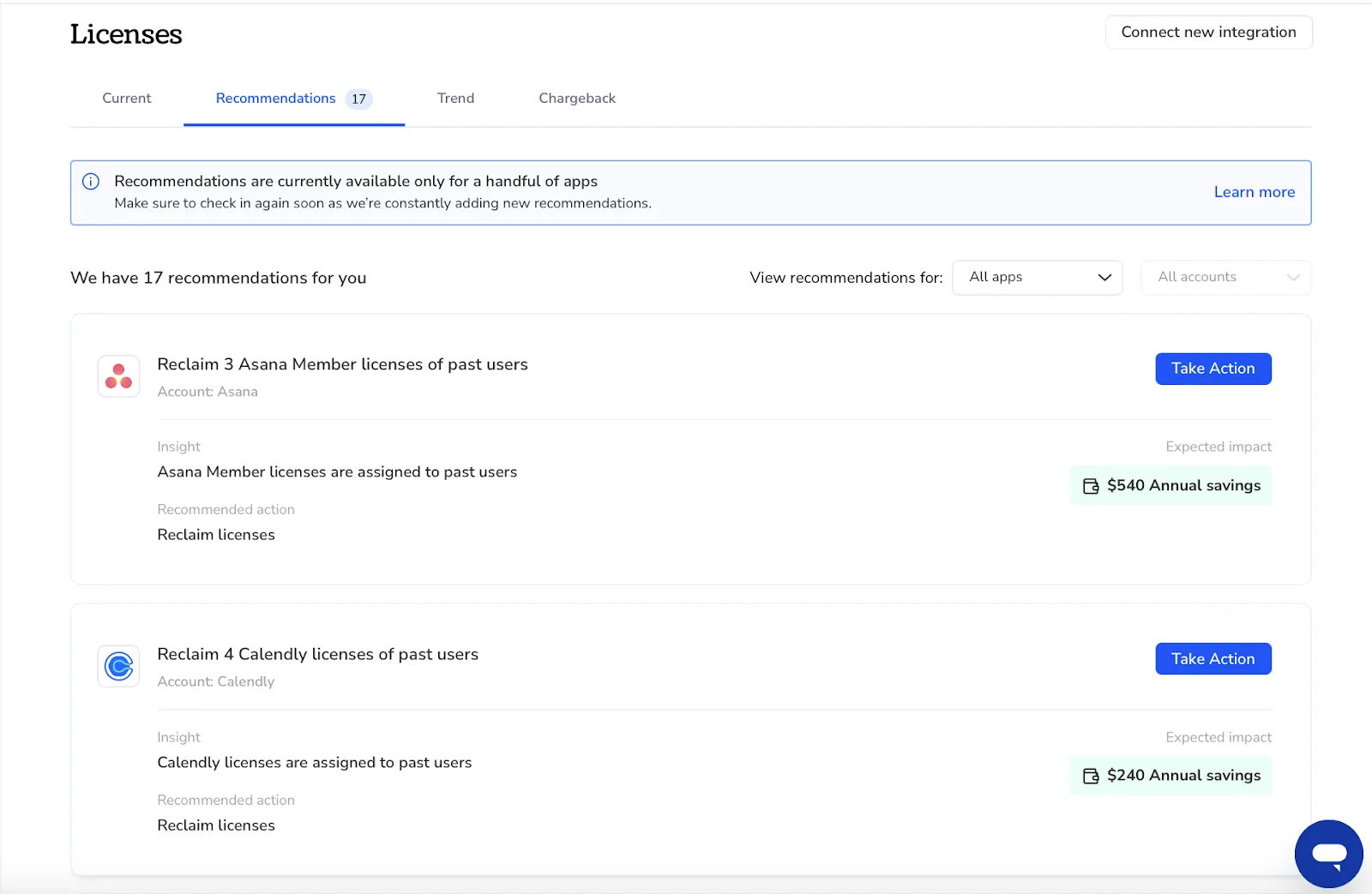
Torii’s current cost-savings recommendations include:
- Reclaiming unused licenses
- Reclaiming past user licenses
- Downgrading underutilized licenses
Through the Recommendations tab, IT managers can tailor SaaS costs exactly to their employees’ technology needs while cutting wasted spend.
Downgrading Underused License Tiers Based on Usage
Most of your expensive apps offer subscription tiers. Think of apps like Salesforce and Zoom.
Different tiers include different functionality that employees might or might not use. For example, every employee needs Zoom—however, not all employees host meetings over 40 minutes.
Before, to save costs based on tiers, you could either:
- Send out a questionnaire
- Guess
- Do nothing
But for Torii users, this multiple choice is skipped entirely through the Recommendations tab. Instead, by tracking user engagement with these applications, Torii can identify when an employee isn’t leveraging the full extent of their “pro” license and allow you to downgrade the user to a cheaper or free tier.
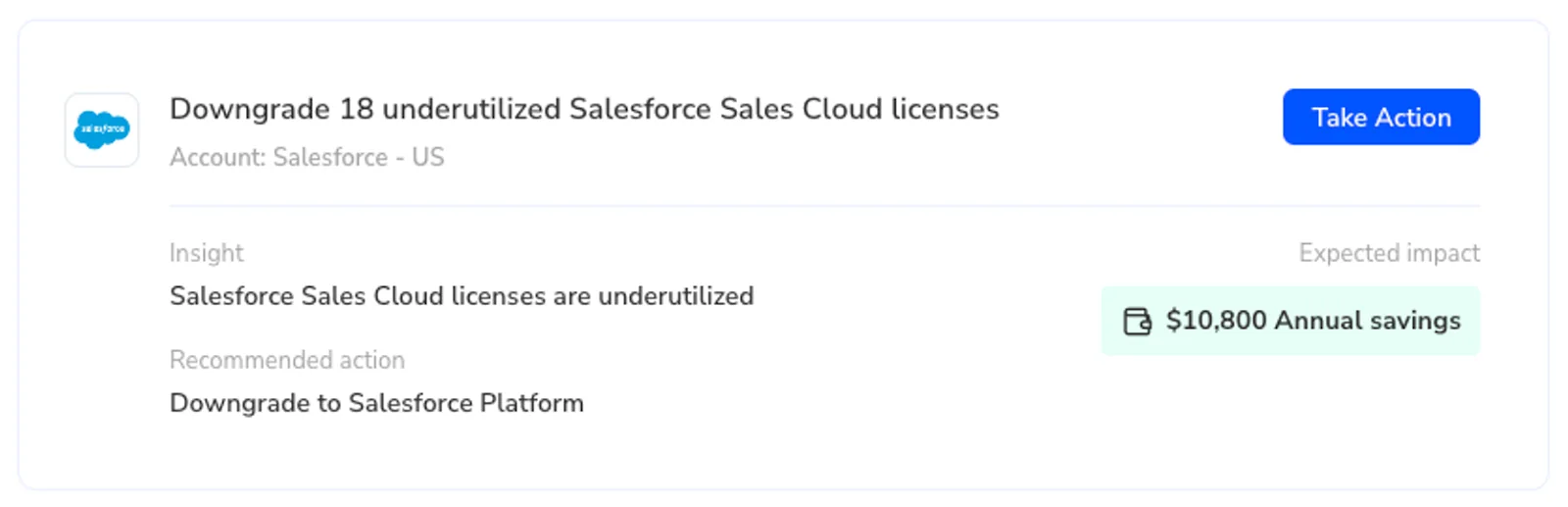
But that’s not all. Torii understands the hidden costs of security breaches too.
That’s why Torii also provides security-based recommendations, such as reclaiming a past employee’s license, even when there isn’t an immediate cost-savings impact. This way, you can keep your sensitive data safe with a click of a button.
Note: Learn more about Torii’s streamlined Offboarding Automation that lets you create workflows for when an employee leaves your organization.
Application Comparison Recommendations to Rationalize Your Stack
Torii not only allows you to uncover cost savings, but it also optimizes your SaaS License management and contracts.
In addition to Torii’s dynamic renewal calendar, automated renewal alerts, and license cost-benchmarking, our platform will automatically surface similar applications for comparison, allowing you to quickly and easily rationalize your SaaS stack.
Torii automatically identifies your similar or overlapping applications and lets you compare them—side by side—in one view. Hours of research in seconds so you can find out which apps are popular and which are dead weight.
You can drill down into these app comparisons to reveal:
- Overlapping users
- App adoption rates
- Usage trends
- Key application capabilities
- And more!
For example, many first-time Torii users find out they have too many productivity apps. A common comparison is Asana and Monday.
The comparison recommendation tells you immediately that:
- You have 30 overlapping users between the two tools ($$)
- Asana has a downward trend in usage and adoption
- Simultaneously, Monday is picking up steam as the tool of choice
- You also find that both tools have several idle or unclaimed licenses
With these insights, you can choose the best course of action, whether that means cost savings by reclaiming unused, idle, and duplicative licenses or considering removing Asana altogether and driving the adoption of a singular, more popular app—Monday.
This way, you can cut wasted spend associated with redundant tech (app subscription & license costs) while improving operational efficiency and collaboration by ensuring all your employees have access to and are working from the same information.
Note: you can create a workflow based on app adoption and usage with Torii’s no-code workflow engine. Design a workflow to send alerts as different criteria are met for your apps so you see emerging trends within your organization. Learn more here
Usage-Based License Optimization, from Recommendation to Action
Recommendations only matter if they turn into savings. Here is how usage-based license monitoring in Torii becomes continuous SaaS license optimization instead of a once-a-year cleanup.
- Usage is tracked per user. Torii continuously matches every license to real usage, so inactive, duplicate, and abandoned seats get flagged as they appear.
- Usage becomes a recommendation. The Recommendations tab turns that data into specific actions: reclaim unused licenses, reclaim past user licenses, or downgrade underused licenses to a cheaper tier.
- You act on it, or automate it. Act on a recommendation directly, or build a no-code workflow that reclaims seats, right-sizes tiers, and routes approvals the moment usage drops. App owners can approve changes for the tools closest to them, while IT and Finance keep policy guardrails and full visibility.
- You right-size before renewal. Torii’s renewal calendar and automated renewal alerts give you time to act on recommendations before a contract auto-renews, so you stop paying for seats nobody needs.
Every license, assignment, and change is recorded in an audit-ready ledger, so each cost decision is documented when budget reviews come around. Learn more about license optimization in Torii, see how to find and reclaim unused SaaS licenses, or explore contract and renewal management.
Streamline SaaS Spend Optimization
Torii’s complete SaaS management platform unlocks continuous cost savings. Our advanced insights, recommendations, and automation allow you to easily save on SaaS licenses and subscriptions, all in one place.