

6 GitHub Copilot Usage Dashboards and Monitoring Tools for 2026
 Chris Shuptrine
•
Jun 21, 2026
•
12 min read
Chris Shuptrine
•
Jun 21, 2026
•
12 min read

Compare 6 GitHub Copilot usage dashboards and monitoring tools for tracking adoption, acceptance rate, and idle seats in 2026.
Ask about this article
Opens Claude in a new tab to answer, using this article as the source.
GitHub Copilot is now standard issue across large engineering orgs, and finance wants proof it earns the bill. The Copilot Metrics API went generally available on February 27, 2026; GitHub said it was “closing down three legacy Copilot metrics APIs as part of our transition to newer, more comprehensive usage metrics endpoints,” and those legacy endpoints shut down on April 2, so last year’s dashboards had to be rebuilt. Business and Enterprise seats run $19 to $39 a month with usage-based premium request credits on top, which makes idle ones a visible cost.
Native reporting covers some of this ground, but it hits walls fast. In-dashboard data caps at 28 days, the last-activity field nulls out after 90 days of silence, and telemetry can lag up to three days before it finalizes. In a GitHub study with Accenture, “developers accepted around 30% of GitHub Copilot’s suggestions,” but that figure alone says nothing about whether a seat pays off, or whether it sits on the right tier under Copilot Business and Enterprise plan management.
Business and Enterprise Copilot seats run $19 to $39 a month, native dashboards cap history at 28 days, and the last-activity field nulls out after 90 days of silence. Acceptance rate ran around 30% in GitHub's Accenture study, but a used seat and a paid-for seat are not the same thing.
So teams reach for tools that go further, whether through longer history, ROI correlation, or finding seats nobody opened. Here is how Torii, GitHub Copilot, Copilot Metrics Viewer, Datadog, Faros AI, and Productiv compare for tracking Copilot usage in 2026.
★ = low · ★★ = medium · ★★★ = high
| Tool | Adoption & Usage | Seat Visibility | Automation | Ease of Setup |
|---|---|---|---|---|
| Torii | ★★★ | ★★★ | ★★★ | ★★ |
| GitHub Copilot | ★★★ | ★★ | ★ | ★★ |
| Copilot Metrics Viewer | ★★★ | ★★ | ★ | ★ |
| Datadog | ★★★ | ★★ | ★★ | ★ |
| Faros AI | ★★★ | ★ | ★★ | ★★ |
| Productiv | ★★ | ★★★ | ★★ | ★ |
Table of Contents
Torii
Torii is an AI Management Platform that treats Copilot as a managed app at the seat and spend layer, not the IDE telemetry layer. It discovers every Copilot seat in use, including shadow ones bought on personal cards, by pulling browser activity, SSO, HRIS, and expense signals. A seat your metrics API never sees is still a seat finance pays for.
Where native dashboards stop at assigned-versus-active counts, Torii reads real license utilization and flags seats idle for 90 days or more. Its standout move is acting on that data, with automated reclamation, reassignment, and downgrade policies routed to app owners and a full audit trail. The platform also detects overlapping AI spend when one team funds Copilot, Cursor, and Claude at the same time.
Offboarding workflows tie seat removal to employee exits, so a departing developer’s license frees the same day, the kind of control you also see in dedicated GitHub Copilot license and spend tools. You can see the model on the Torii AI management platform page.
Where Torii fits Copilot monitoring:
- Surfaces shadow Copilot seats through browser, SSO, and expense data
- Flags seats idle 90 days or more from real utilization
- Reclaims, reassigns, or downgrades licenses through approval workflows
- Revokes Copilot access automatically when an employee leaves
Pros:
- Multi-source discovery that catches seats off the IdP
- Usage-based reclamation that downgrades idle licenses
- Automated offboarding that frees seats on exit
- Cross-tool view of Copilot, Cursor, and Claude spend
Cons:
- Built for enterprise breadth, so it is not the cheapest option here
- Centered on SaaS and shadow IT, with no on-premise deployment
| G2: 4.5/5 (303 reviews) | Capterra: 4.9/5 (26 reviews) |
GitHub Copilot
GitHub Copilot is the built-in baseline every admin starts from before adding anything else. After the Metrics API reached GA in February 2026, it offers usage, code-generation, and org or enterprise adoption dashboards alongside a seat-management page. That page shows active-this-cycle versus inactive-this-cycle, plus last_activity_at and last_activity_editor for each user.
A dedicated view-metrics role lets stakeholders self-serve the numbers without full admin rights. You get acceptance rate, suggestions shown versus accepted, and adoption broken out by team, which covers the basic question of who actually uses their seat. The same data feeds straight into the API for anyone building reports on top of it.
The honest limits are worth knowing before you rely on this alone. In-dashboard retention stops at 28 days, and GitHub’s docs note that “after 90 days of no new activity, a user’s last_activity_at value is set to nil.” Telemetry can also lag up to three days before it finalizes. None of it ties Copilot back to shipped work. The GitHub usage and adoption docs cover the setup.
What native reporting covers:
- Usage, code-generation, and adoption dashboards post-GA
- Seat page with active-versus-inactive and last_activity fields
- View-metrics role for stakeholder self-service
- Metrics API for custom reporting
Pros:
- Free and already inside your GitHub admin console
- Direct source data with no third-party connector
- API access for building custom dashboards
Cons:
- 28-day in-dashboard retention with no long history
- Activity data drops after 90 days, hiding long-idle seats
- No link between usage and engineering outcomes
| G2: 4.5/5 | Capterra: 4.6/5 |
Copilot Metrics Viewer
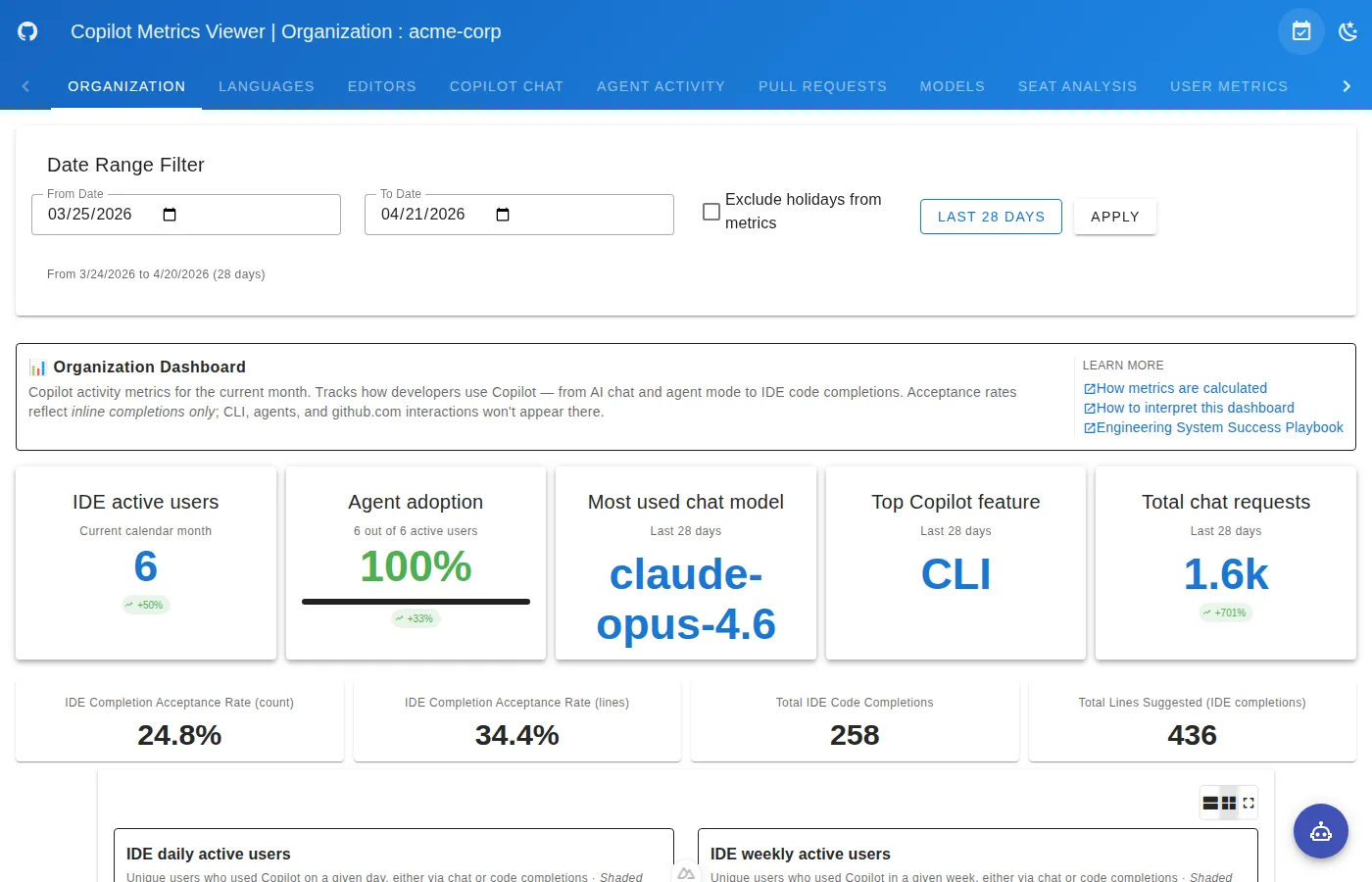
Copilot Metrics Viewer is the free, open-source app that visualizes the Copilot Metrics API without a license fee. It lives under the official github-copilot-resources org, ships under an MIT license, and you self-host it with Docker. For teams that would rather own the infrastructure than buy another dashboard, this is the DIY route.
Out of the box it renders active users over time, acceptance rates, lines suggested versus accepted, and language breakdowns. Seat and utilization analysis, chat metrics, and per-user or per-team views all come standard. Its real edge over native is a Historical mode backed by PostgreSQL that stores trend data well past the 28-day wall.
Multi-team comparison and CSV export round out what you can pull for a quarterly review. Multi-provider OAuth handles sign-in, so access maps to the identity setup you already run. The project README on its GitHub repository walks through deployment.
What the viewer adds over native:
- Historical mode that breaks the 28-day retention limit
- Acceptance, lines, and language dashboards out of the box
- Per-user and per-team views with CSV export
- Docker self-hosting with multi-provider OAuth
Pros:
- Free and open-source with no per-seat cost
- Unlimited history through its PostgreSQL store
- Full control over hosting and data residency
Cons:
- You own the deployment, upgrades, and uptime
- No spend or seat-reclamation actions, just charts
- Setup needs engineering time most finance teams lack
Datadog
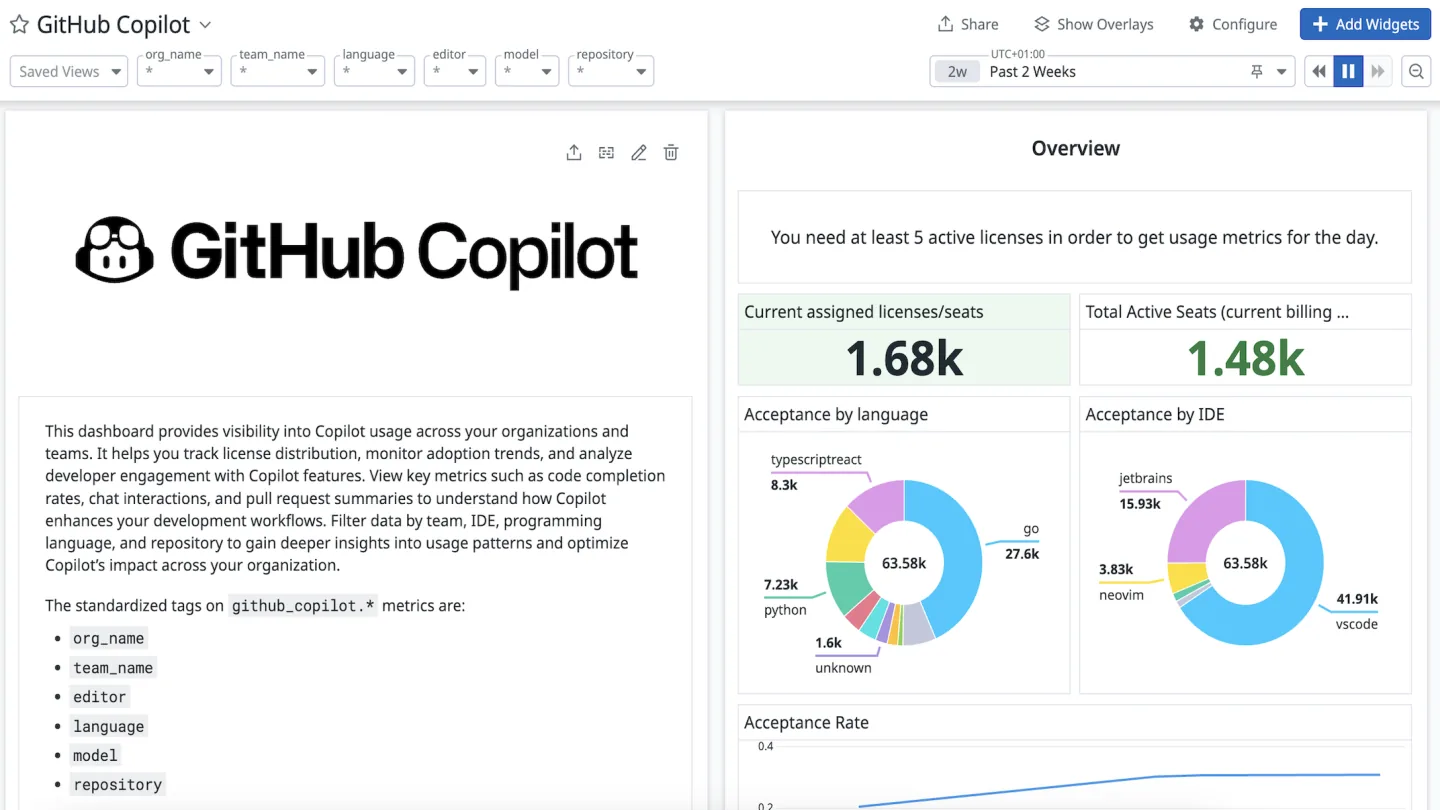
Datadog offers a first-party GitHub Copilot integration that pulls the Metrics API into its observability platform. It ships four prebuilt dashboards covering Overview, Code Completion, Languages, and IDE Chat, so the data lands ready to read. For shops already running Datadog, Copilot becomes one more service on a screen they check daily.
The dashboards surface seat utilization, daily and monthly active users, acceptance rate, and lines per accepted suggestion. You can filter by developer, IDE, language, model, and team, then set custom monitors that alert when adoption drops below a threshold. Agent contribution percentage and chat-by-mode give a finer read than native reporting on how people work.
The bigger draw is correlation, since Copilot data sits next to DORA metrics, CI Visibility, and the rest of your engineering telemetry, much like the broader push to track AI adoption across a company. That lets you test whether rising Copilot use actually moves merge rates or cycle time. Setup details live on the Datadog GitHub Copilot integration page.
Where Datadog fits Copilot monitoring:
- Four prebuilt dashboards from the Metrics API
- Filters by developer, IDE, language, model, and team
- Custom monitors and alerts on adoption thresholds
- Correlation with DORA and CI Visibility data
Pros:
- Deep filtering and custom alerting on usage
- Correlates Copilot with broader engineering metrics
- Familiar home for teams already on Datadog
Cons:
- Real value assumes you already pay for Datadog
- Observability focus, not seat or spend reclamation
| G2: 4.3/5 | Capterra: 4.6/5 |
Native dashboards drop activity after 90 days and miss seats bought outside IT entirely. Torii discovers every Copilot license through SSO, browser, and expense data, reads real utilization, and routes a reclaim or downgrade through approval before the next renewal. See how Torii manages AI spend.
Faros AI
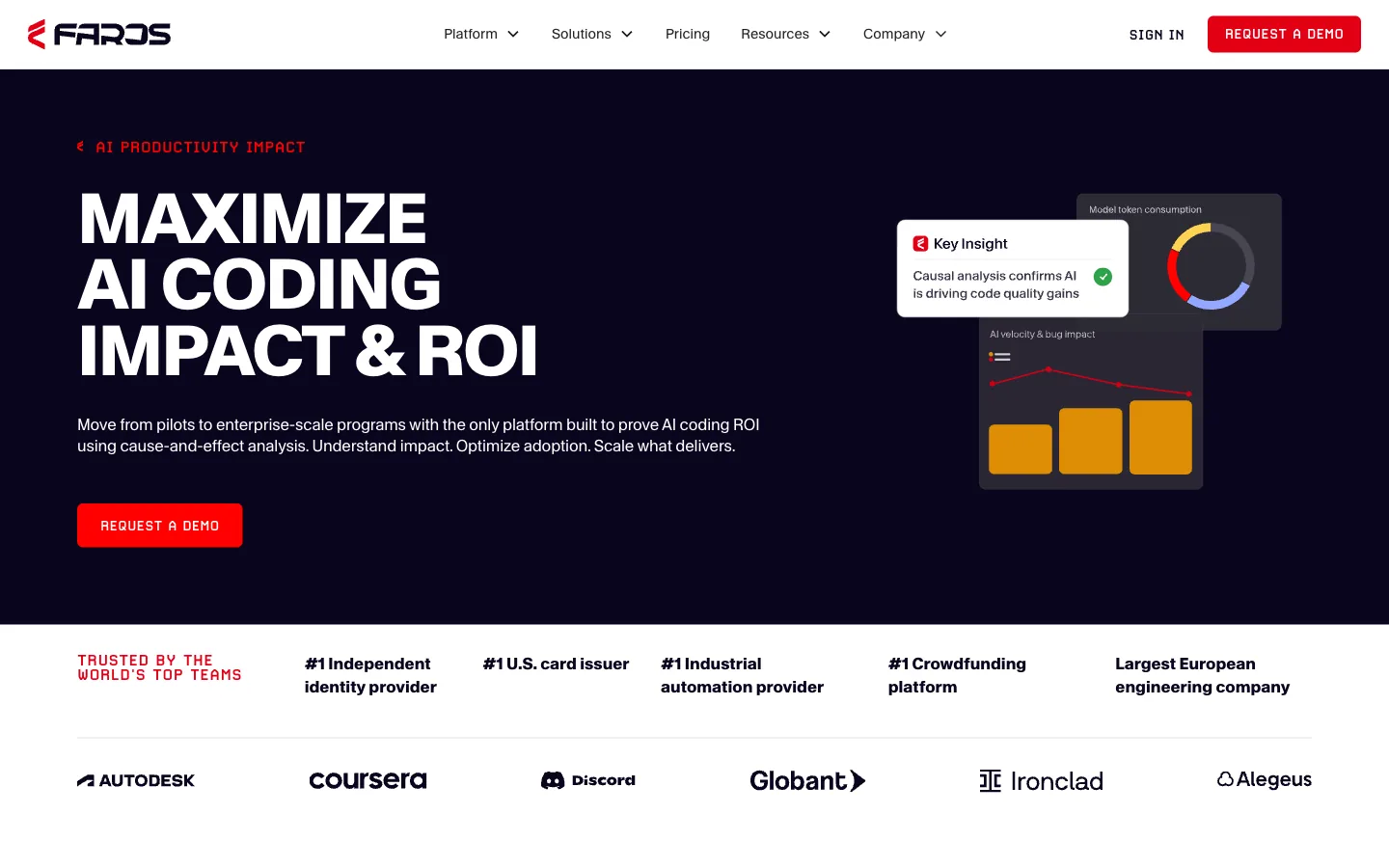
Faros AI is an engineering-intelligence platform whose Copilot module is built to prove ROI, not just track logins. It goes past adoption charts to tie Copilot usage to downstream outcomes like PR velocity, cycle time, and merge rates. The pitch is cause and effect, showing whether the tool actually changes how fast code ships.
You still get the adoption basics, including daily, weekly, and monthly active users plus acceptance rate by language or editor. On top of that, it reports percent of AI-generated code and keeps full history rather than a rolling window. A/B and before-after isolation let you measure a rollout against a control group instead of guessing.
Head-to-head comparison stacks Copilot against Cursor and Claude Code on the same outcome metrics. Persona dashboards split the view for execs, AI leaders, and DevEx teams who each need a different cut. The Faros AI Copilot module page details the approach.
What Faros adds for Copilot teams:
- Usage tied to PR velocity, cycle time, and merge rates
- Percent of AI-generated code with full history
- A/B and before-after rollout isolation
- Copilot-versus-Cursor-versus-Claude comparison
Pros:
- Connects Copilot use to real shipping outcomes
- Controlled experiments instead of vanity metrics
- Role-based dashboards for execs and DevEx
Cons:
- Built to re-engage users, not reclaim idle seats
- Heavier platform than a single usage dashboard
Productiv

Productiv is a SaaS Management Platform whose relevance to Copilot is seat governance, not IDE metrics. Its differentiator is feature-level engagement analytics across more than 50 dimensions, measuring who truly engages with a tool versus who just holds a seat. Applied to Copilot, that means spotting the seats that look active but barely get used.
The platform answers the portfolio question of who has a Copilot seat and is not using it. Its 2025 to 2026 AI Portfolio Governance push added shadow-AI detection that surfaces rogue Copilot seats through SSO, expense, and CASB signals within a day or two. Policy and compliance enforcement sits alongside it for teams formalizing their AI rules, the same remit covered by a full AI management platform.
What you will not find here is acceptance rate or completion data, since Productiv reads engagement instead of IDE telemetry. That tradeoff suits finance and IT leaders sizing the whole AI portfolio rather than tuning developer workflows. The Productiv platform page shows how it works.
Where Productiv fits Copilot management:
- Feature-level engagement across 50-plus dimensions
- Right-sizing seat counts on real usage depth
- Shadow Copilot detection via SSO, expense, and CASB
- AI policy and compliance enforcement at the portfolio level
Pros:
- Deep engagement data beyond simple logins
- Portfolio-wide shadow-AI discovery
- Strong fit for finance-led seat right-sizing
Cons:
- No acceptance-rate or completion metrics
- Heavier fit for larger AI portfolios
G2: 4.6/5 (75 reviews)
How to Choose a Copilot Monitoring Tool
The right pick tracks your main Copilot question in 2026. GitHub’s native dashboards and Copilot Metrics Viewer cover raw Copilot adoption metrics and acceptance rate, Datadog suits teams correlating usage with engineering telemetry, and Faros AI proves ROI against shipped work. Productiv fits portfolio-level seat governance across many AI tools at once.
If idle seats and shadow installs are the real cost, start with what you can actually see. Torii surfaces every Copilot seat through SSO, browser, and expense data, then reclaims the ones nobody touches and revokes access when people leave.
You can only govern the Copilot seats you can see. Torii discovers every AI coding tool in use through SSO, HRIS, browser, and expense data, reads real usage by license tier, and frees seats the moment someone leaves. Explore the Torii platform.
Frequently Asked Questions
Finance proves Copilot ROI by correlating usage with engineering outcomes, extending history, and monitoring seat-level utilization. Combine GitHub Metrics API data with tools like Faros or Datadog to link acceptance rates to PR velocity and cycle time, and use Torii for seat visibility and reclamation.
Native dashboards cap in-dashboard retention at 28 days, null last_activity after 90 days of silence, count only IDE traffic, and can lag telemetry up to three days. They also omit web and mobile chat and provide no built-in link between Copilot use and shipped work.
Find shadow seats by aggregating SSO, browser, HRIS, expense, and CASB signals; Torii and Productiv use those sources to surface licenses bought outside IT. Once identified, Torii automates reclamation, reassignments, or downgrades and ties revocation to offboarding workflows.
Extend Copilot history by exporting Metrics API data to a long-term store. Use Copilot Metrics Viewer with its PostgreSQL-backed Historical mode or pipe data into Datadog or Faros for persistent retention, trend analysis, and CSV exports for quarterly reviews.
To prove ROI rather than vanity metrics, choose Faros AI for experiments that tie Copilot use to PR velocity, merge rates, and cycle time. Datadog helps correlate Copilot with DORA metrics, while native dashboards only show acceptance and raw adoption numbers.
Automate reclaiming idle seats by setting 90-day inactivity policies tied to discovery and approval workflows. Torii provides automated reclamation, reassignments, and downgrade actions routed to app owners; Productiv flags unused seats for right-sizing but does not enact removals automatically.