The Modern Video Stack
Today, video is everywhere. It’s an essential way to scale asynchronous communication. It’s critical for training, social, internal messaging, and brand storytelling. The tools used to make these videos are also growing faster than ever.
Updated October 7, 2026 · Changelog
But with so many apps available today, that raises a question:
What does the modern video software stack actually look like?
To answer that, we broke down the video creation process into seven key phases that reflect how most companies produce video content today:
- Ideation & concepting
- UGC & creator connection
- AI generation & AI avatars
- Recording
- Editing
- Localization & dubbing
- Hosting, management, & distribution
Other phases may exist, depending on the workflow or content type; however, these are the seven phases that capture the most common steps across organizations.
However, it's also important to note that workflows vary based on the use, audience, and company culture. For example, a UGC ad campaign localized for different markets will look wildly different from a sales demo or a creative campaign. The point is that all of these workflows are for the purpose of creating video to help the company acheive their goals.
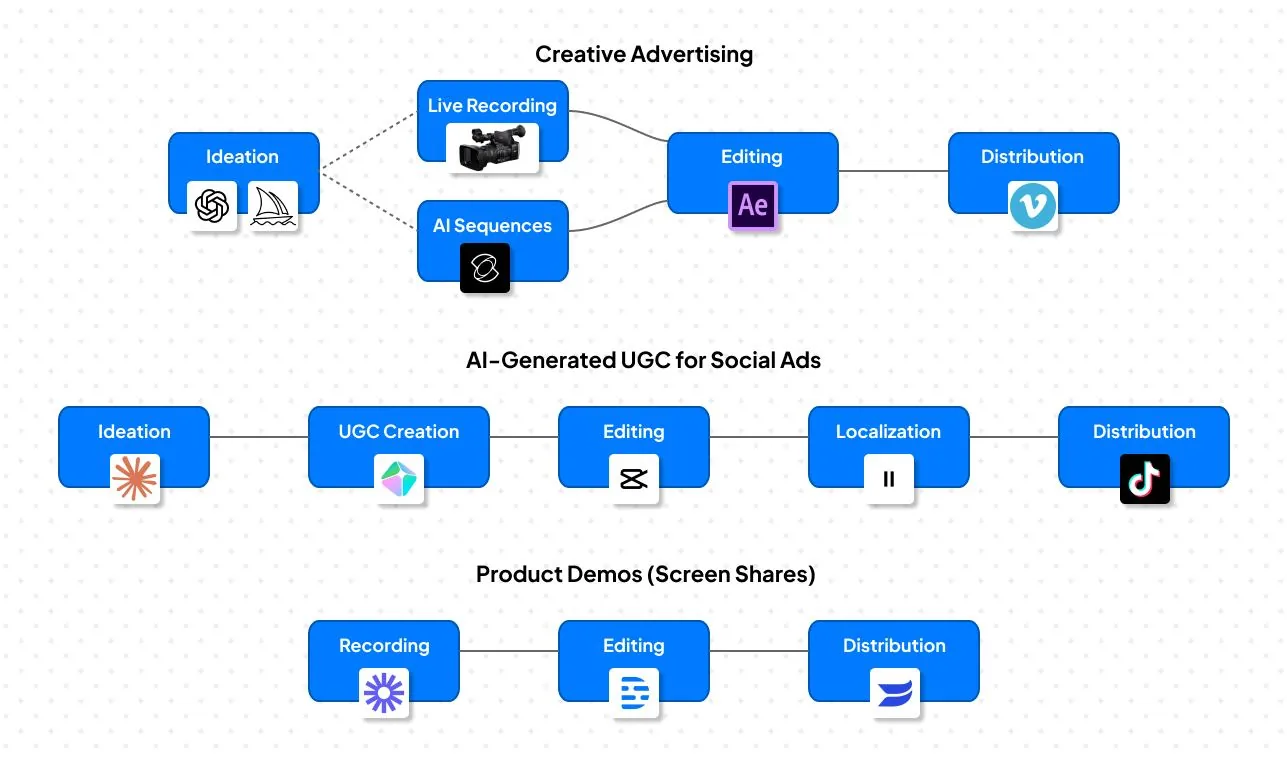
In the sections that follow, we’ll use Torii’s anonymized internal data, to understand where new technologies are (and aren’t) replacing legacy solutions.
We’ll also examine where gaps may exist for many companies.
Let’s dive in.
Ideation & concepting
Ideation can include storyboarding, scripting, mood-boarding, and high-level concept planning. Many teams still default to familiar tools like Google Docs, Figma, Miro, and Notion to outline story beats, organize visual references, and collaborate on drafts.
But, the real disruption is happening now: generative AI is turning ideation into an experimental playground. Instead of waiting weeks for concept art or mockups, creators are using prompt-based image and short-video generation tools to prototype visuals in minutes. These tools, such as Midjourney, Stable Diffusion, Runway, or Lighttricks’ LTX Studio, enable teams to test ideas faster than ever.
Additionally, the script writing process is now heavily influenced by the use of LLMs like ChatGPT, Claude, Gemini, and Grok.
The amount of human review and oversight varies by company and video type, but overall, ideation timelines are being cut dramatically thanks to these AI tools.
UGC and creator connection
Today, user-generated content (UGC) is a genre in its own right, and for many companies, it represents a top channel for marketing. Brands rely on creators and micro-influencers to deliver authentic content at scale. However, with generative AI, “user-generated” content is increasingly synthetic, as it builds avatars, voices, and motion from code.
UGC Generators
Show as table
| App | Adoption |
|---|---|
| Veed.io | 59% |
| HeyGen | 54% |
| Synthesia | 52% |
| Arcads | 12% |
Source: Torii anonymized usage data. Chart published October 10, 2025.
- Veed.io (59%), Browser-based video editor with AI captions and social formats.
- HeyGen (54%), AI avatar platform for text-to-video and synthetic UGC.
- Synthesia (52%), AI video generator using digital presenters and templates.
- Arcads (12%), AI UGC ad creator; generates influencer-style videos from text.
UGC Marketplaces and Connectors
Show as table
| App | Adoption |
|---|---|
| Bazaarvoice | 5% |
| Collabstr | 4% |
| Billo | 3% |
| AspireIQ | 2% |
Source: Torii anonymized usage data. Chart published October 10, 2025.
- Bazaarvoice (5%), Collects, curates, and displays customer reviews and UGC.
- Collabstr (4%), Connects brands with influencers for paid UGC collaborations.
- Billo (3%), Marketplace for sourcing creators to produce brand UGC videos.
- AspireIQ (2%), Influencer/creator management platform for authentic UGC campaigns.
Why this matters:
- AI-generated UGC allows hyper-scalability and A/B variant testing at low cost
- It blurs the line between authentic and synthetic, raising questions of transparency
- Many organizations are adopting hybrid workflows: real creators for flagship content, AI avatars for high-volume, fast-turn assets
- Tools that historically focused on sourcing creators (e.g. AspireIQ, Upfluence, Yotpo) are increasingly threading into or feeding AI-native pipelines.
In short, the UGC space is evolving into a hybrid ecosystem where real creators, creator marketplaces, and AI generator tools all coexist. And brands that master orchestration win.
AI generation & AI avatars
What once seemed futuristic is now part of everyday video workflows. Computer-generated graphics (CGI) that cost Hollywood studios millions of dollars can now be mimicked (to varying degrees) for just a few cents' worth of credits.
And while there are significant caveats around quality, character consistency, time limits, and details of physics, the fact remains: AI video is a transformative technology.
Based on Torii’s aggregated SaaS data, over half of organizations have adopted at least one AI avatar or text-to-video generation tool.
AI avatar & presenter platforms
Show as table
| App | Adoption |
|---|---|
| HeyGen | 54% |
| Synthesia | 52% |
| Colossyan | 7% |
| D-ID | 1% |
Source: Torii anonymized usage data. Chart published October 10, 2025.
- Colossyan (7%) - AI video creation with realistic avatars and script-based scenes.
- D-ID (1%) - Turns photos into talking videos; facial animation and lip-sync from text or audio.
- HeyGen (54%) - AI avatar and video generator for marketing, UGC, and internal comms.
- Synthesia (52%) - Enterprise-grade AI presenter videos for training, onboarding, and explainer content.
Prompt-to-video & generative models
Show as table
| App | Adoption |
|---|---|
| Midjourney | 64% |
| Runway | 55% |
| Kling | 26% |
| Pika | 26% |
| Google Veo | 14% |
| Adobe Firefly | 2% |
Source: Torii anonymized usage data. Chart published October 10, 2025.
- Adobe Firefly Video / Creative Cloud (2%) - Adobe’s generative video feature within Firefly and Premiere; early enterprise adoption.
- Google Veo (14%) - Text-to-video model producing cinematic, photorealistic scenes from prompts.
- Kling (26%) - Chinese-developed text-to-video generator known for fast, lifelike motion rendering.
- Midjourney (64%) - Primarily text-to-image, but widely used for generating video frames and motion concepts.
- Pika (26%) - Converts text, image, or rough clips into short, stylized video sequences.
- Runway (Gen-3 / Gen-4) (55%) - Industry-leading AI video engine; text-to-video and video-to-video generation with strong realism.
Among AI avatars, HeyGen and Synthesia lead the pack while the prompt-to-video models are more varied. What’s clear is that new tools from legacy companies (such as Adobe’s Firefly and Google’s Veo) have been less successful in leveraging their pre-existing distribution channels to gain traction. Instead, most adoption is found among apps specifically built for gen-AI video. (Runway, Kling, Pika). Midjourney has the highest adoption numbers, mainly due to its existing user base and leading image generation capabilities.
Recording
Because Torii monitors app adoption, we can’t reliably track how often companies use traditional recording setups (such as cameras, studios, etc.). However, we can see how frequently companies use screen capture tools. And they use them a lot.
From demos to documenting SOPs, every company has at least one app for recording on-screen actions or activities. Even as AI tools advance, companies still trust real recording, especially in product demos, walkthroughs, and training, where authenticity and accuracy are more important than speed and automation.
Based on anonymized adoption data, these apps are the most popular for screen capture.
Here are the most common screen capture and recording tools found across company stacks:
Show as table
| App | Adoption |
|---|---|
| Loom | 89% |
| Descript | 69% |
| Vidyard | 66% |
| Veed.io | 59% |
| Snagit | 53% |
| Wistia | 52% |
| Screencastify | 42% |
| Camtasia | 38% |
| Greenshot | 29% |
| Screen Studio | 23% |
Source: Torii anonymized usage data. Chart published October 10, 2025.
- Loom (89%), Records screen and webcam simultaneously; used widely for asynchronous communication, demos, and internal updates.
- Descript (69%), All-in-one tool for recording, transcription, and editing using text-based video editing.
- Vidyard (66%), Screen and camera recorder with integrated analytics and sharing tools; popular for sales and customer engagement.
- Veed.io (59%), Browser-based screen recorder with built-in editing and social export features.
- Snagit (53%), Classic capture tool for recording on-screen activity, still images, and quick tutorials.
- Wistia (52%), Combines video hosting with screen recording and embedding tools for marketing and customer education.
- Screencastify (42%), A browser-based screen recorder often used for quick tutorials, educational videos, and internal walkthroughs, with easy export to Google Drive or YouTube.
- Camtasia (38%), Longtime leader in professional screen recording and editing, especially for training and explainer content.
- Greenshot (29%), Screenshot and quick-capture utility, often used to annotate visuals or static frames for video projects.
- Screen Studio (23%), Lightweight, simple recorder for product demos and design walkthroughs.
Editing
The editing phase is one of the most varied phases of the entire process. It might take weeks of work, using manual editing tools like Davinci Resolve or Adobe Premiere Pro and After Effects, or it might take minutes with AI-augmented tools like CapCut or even fully AI-powered apps like Opus Clips.
Some tools, such as Canva and Adobe Express, offer lightweight editing within their broader tool suite.
Here’s how the editing app landscape appears across company stacks:
Show as table
| App | Adoption |
|---|---|
| Canva | 97% |
| Descript | 69% |
| CapCut | 68% |
| Adobe Express | 57% |
| Premiere Pro | 47% |
| After Effects | 43% |
| DaVinci Resolve | 39% |
| Opus Clip | 33% |
Source: Torii anonymized usage data. Chart published October 10, 2025.
- Canva (97%), Web-based creative suite for simple video editing, templates, text overlays, and social media exports.
- Adobe Express (57%), Lightweight creative and video editing app within Adobe’s ecosystem, focused on quick content creation.
- CapCut (68%), AI-powered social video editor (owned by ByteDance) with auto-captions, templates, and trending video formats.
- Descript (69%), Combines editing, transcription, and screen recording with text-based and AI editing tools.
- Opus Clip (33%), AI auto-editor that transforms long videos into short, social-ready clips.
- Adobe Premiere Pro (47%), Industry-standard professional video editor for high-quality productions and broadcast-ready work.
- Adobe After Effects (43%), Visual effects and motion graphics powerhouse, often paired with Premiere Pro for advanced compositing.
- DaVinci Resolve (39%), Professional-grade editor and color-correction suite favored in film and post-production workflows.
Traditional editors (Premier Pro, After Effects, Davinci Resolve, etc.) still dominate where high polish matters: brand campaigns, interviews, and case studies. But the fastest growth is happening in AI-assisted or auto-generated video editing, especially for social and marketing teams that prioritize speed and iteration over precision.
The next frontier will likely find a balance between these worlds. More seamless AI-augmented video editing that allows users to easily apply exact edits with simple prompts, thus speeding up the process without sacrificing professional control.
Localization or dubbing
Audiences are global, multi-lingual, and increasingly expectant of personalized digital experiences. Fortunately, AI is enabling more companies to meet these expectations without the time and expense of traditional localization efforts.
At the same time, translation technology is one of the most mature forms of artificial intelligence, with a history that predates the birth of Sam Altman himself.
However, as technology has improved from simple rule-based translation to more nuanced localization, though human intervention is still critical in many instances.
Many tools can also provide lip-syncing, voice-cloning, and AI avatars.
Looking at adoption rates for different apps, we see some familiar and some specialized tools for these uses:
Show as table
| App | Adoption |
|---|---|
| ElevenLabs | 69% |
| Veed.io | 59% |
| HeyGen | 54% |
| Synthesia | 52% |
| Kapwing | 47% |
| Rask AI | 13% |
| Mastra | 8% |
| Dubverse | 3% |
| DeepDub | 2% |
Source: Torii anonymized usage data. Chart published October 10, 2025.
- HeyGen (54%), Offers multilingual avatars with automatic translation and lip-sync across over 40 languages.
- Synthesia (52%), Provides voice dubbing, subtitles, and multi-language avatars for corporate and training videos.
- Veed.io (59%), Includes automatic subtitle generation, AI translation, and simple voiceover tools for short-form content.
- ElevenLabs (69%), Advanced AI voice synthesis platform for ultra-realistic dubbing, voice cloning, and multilingual narration.
- Rask AI (13%), Specializes in AI dubbing and translation, offering fast video localization for YouTube and marketing content.
- Mastra (8%), AI tool for automatic voiceover and translation of short videos, aimed at creators and social media teams.
- Kapwing (47%), Browser-based editor with subtitle translation, voiceover support, and auto-caption features.
- DeepDub (2%), AI-powered dubbing and lip-sync tool designed for film, streaming, and e-learning content.
- Dubverse (3%), Web-based AI dubbing platform supporting multiple Indian and global languages; gaining traction for short-form videos.
Hosting, management, & distribution
A video without an audience is a missed opportunity. Once videos are created and edited, teams rely on hosting and management platforms to store, share, and analyze performance across internal and external channels and audiences.
While social media platforms remain the biggest outlet for video distribution, many companies also use specialized platforms to host, embed, and monitor their content. Particularly, for marketing, sales, and training.
Here’s how those tools appear across organizational tech stacks:
Show as table
| App | Adoption |
|---|---|
| Loom | 89% |
| Vimeo | 81% |
| Vidyard | 66% |
| Wistia | 52% |
| Microsoft Stream | 38% |
| StreamYard | 33% |
| Brightcove | 8% |
| Bazaarvoice | 5% |
Source: Torii anonymized usage data. Chart published October 10, 2025.
- Vimeo (81%), The most common enterprise hosting solution for internal, external, and embedded video delivery; strong analytics and privacy controls.
- Loom (89%), Hybrid tool for recording, hosting, and sharing screen-based or webcam videos; popular for asynchronous communication and internal training.
- Vidyard (66%), Hosting and analytics platform geared toward sales enablement and customer engagement.
- Wistia (52%), Hosting and performance analytics for marketing videos, webinars, and podcasts, with brand customization options.
- Brightcove (8%), Enterprise-grade video hosting and streaming platform with ad monetization and live broadcast capabilities.
- Bazaarvoice (5%), Primarily a UGC and review platform but also hosts and syndicates customer-generated video content for e-commerce.
- StreamYard (33%) - Primarily used to simulcast live streams between multiple platforms
- Microsoft Stream (38%), Integrated into Microsoft 365; commonly used for internal training and corporate communications.
Today, the hosting and distribution phase is increasingly integrated with the communication and analytics. Tools like Loom and Videyard blur the lines between creating, sharing, and tracking, thus turning every video into measurable engagement data.
Meanwhile, Vimeo and Wistia remain the backbone for external hosting, providing control and brand presentation that enterprises need.
Conclusion: the modern video stack is in motion
The video software stack is no longer a linear production line. It’s an ecosystem.
Our anonymized data shows that companies are constantly adopting more tools for broad and specialized use cases. From ideation to distribution, teams blend traditional craft with generative AI.
We see a clear pattern:
- AI is embedded in every phase of the journey
- Tools are expanding into multiple phases of the production cycle
- Sanctioned software is losing ground to new shadow IT applications
As video continues to dominate communication, marketing, and training, the defining question for teams isn’t whether or not to use a particular tool, but rather how to build the right process for the right kind of video.
Apps in this article
- Google Docs
- Figma
- Miro
- Notion
- Midjourney
- Stable Diffusion
- Runway
- Lighttricks LTX Studio
- ChatGPT
- Claude
- Gemini
- Grok
- Veed.io
- HeyGen
- Synthesia
- Arcads
- Bazaarvoice
- Collabstr
- Billo
- AspireIQ
- Upfluence
- Yotpo
- Colossyan
- D-ID
- Kling
- Pika
- Google Veo
- Adobe Firefly
- Loom
- Descript
- Vidyard
- Snagit
- Wistia
- Camtasia
- Screen Studio
- Screencastify
- Greenshot
- Canva
- CapCut
- Adobe Express
- Adobe Premiere Pro
- Adobe After Effects
- DaVinci Resolve
- Opus Clip
- ElevenLabs
- Rask AI
- Mastra
- Kapwing
- DeepDub
- Dubverse
- Vimeo
- StreamYard
- Brightcove
- Microsoft Stream
Changelog
- ClarificationStandardized the data source description.
- UpdateMoved from toriiresearch.com.