

Microsoft Teams User Access Reviews: 6 Leading Vendors in 2026
 Chris Shuptrine
•
Dec 10, 2025
•
12 min read
Chris Shuptrine
•
Dec 10, 2025
•
12 min read

Compare six platforms for running Microsoft Teams access reviews in 2026, from SaaS governance tools to enterprise IGA solutions with automation.
Ask about this article
Opens Claude in a new tab to answer, using this article as the source.
Microsoft Teams licenses add up fast once departments start spinning up channels, adding external collaborators, and inviting guest users to projects. Running periodic access reviews confirms that only current employees have active Teams accounts, that guest access stays limited to people who still need it, and that premium licenses match actual usage patterns across your organization.
Microsoft 365 plans with Teams range from $7.20 to $22 per user monthly. A single overlooked inactive account wastes $86-$264 per year, and unreviewed guest access creates data exposure risks that compound with each quarter you skip reviews.
The challenge with Teams access reviews comes down to scope and context. Microsoft Entra ID shows who has accounts and their last sign-in dates, but it does not tell you whether someone actually collaborates in specific channels or if their guest access still serves a business purpose. Third-party tools fill this gap by pulling data from Microsoft Graph APIs and layering on usage analytics, manager workflows, and compliance automation that native admin consoles lack.
This guide covers six platforms worth evaluating for Microsoft Teams access reviews in 2026. Some connect directly to Microsoft 365 through deep integrations that sync users, permissions, and activity data. Others work through identity providers and may miss granular Teams-specific details like channel memberships and guest relationships. Each section breaks down what the tool does well, where it falls short, and review ratings from G2 and Capterra.
★ = low · ★★ = medium · ★★★ = high
| Tool | Ease | Cost | AI Capabilities | Reviews |
|---|---|---|---|---|
| Torii | ★★★ | ★★ | ★★★ | ★★★ |
| ConductorOne | ★★★ | ★ | ★★★ | ★ |
| Nudge Security | ★★★ | ★★ | ★★ | ★ |
| Lumos | ★★ | ★ | ★★★ | ★★ |
| Saviynt | ★★ | ★ | ★★★ | ★★ |
| MiniOrange | ★★★ | ★★★ | ★ | ★ |
Table of Contents
Torii
Torii connects directly to Microsoft Teams through a native integration that syncs all users within your connected tenant. The platform pulls user data, license information, and department details for each Teams account. For organizations using Microsoft 365, Torii can correlate Teams access with other Microsoft apps like SharePoint and OneDrive to provide a unified view of access across the suite.
The access review workflow in Torii lets administrators initiate reviews for Microsoft Teams directly from the Security dashboard. Reviewers see contextual data from HRMS systems, SSO providers, and user status information to make informed decisions about whether someone should retain access. Each review allows approve or reject actions with comments, and completed reviews lock for compliance documentation with CSV export options available for auditors.
One limitation to note is that Torii relies on Microsoft Graph API data, which provides user status and license information but may not capture granular channel-level activity or meeting participation metrics. Reviewers should factor in these gaps when evaluating whether a user actively uses Teams versus simply having an assigned license.
Pros:
- Direct Microsoft 365 integration syncs users, licenses, and department data automatically
- AI-powered discovery identifies shadow access and orphaned accounts across your SaaS stack
- Combined SaaS management and identity governance in one platform eliminates tool sprawl
- Workflow automation handles Microsoft Teams provisioning and deprovisioning based on review outcomes
Cons:
- Pricing positions Torii as an enterprise solution rather than the cheapest option available
- Cloud-only platform focused on SaaS and shadow IT, with no on-premise deployment option
G2 Rating: 4.5 out of 5 (302 reviews)
Capterra Rating: 4.9 out of 5 (26 reviews)
ConductorOne
ConductorOne takes an AI-native approach to Microsoft Teams access reviews through its Unified Identity Graph that centralizes identity data from cloud apps and directories. The platform connects to Microsoft 365 through real-time sync with Entra ID, pulling user accounts, group memberships, and Teams-related entitlements into certification campaigns that reviewers can complete directly in Slack.
ConductorOne stands out for Teams governance primarily due to implementation speed. Customers report connecting applications and running their first access reviews in under four weeks, compared to months for legacy IGA tools. The platform’s AI agents handle routine certifications automatically, flagging only high-risk access patterns for human review. For Microsoft Teams specifically, this means reviewers can focus on external guest users and elevated permissions rather than rubber-stamping every employee account.
Just-in-time access workflows convert standing Teams privileges to time-bound temporary access. Instead of granting permanent guest access to external collaborators, administrators can set expiration dates that trigger automatic revocation when projects conclude.
Pros:
- AI agents automate routine certification decisions, reducing reviewer workload significantly
- Average four-week implementation gets Teams reviews running faster than enterprise alternatives
- Slack integration allows approvals without leaving the workflow
Cons:
- Cannot modify access levels during reviews, only remove access entirely
- Custom pricing requires sales engagement with no public rate card available
- Smaller review base on G2 compared to more established competitors
G2 Rating: 4.8 out of 5 (13 reviews)
Nudge Security
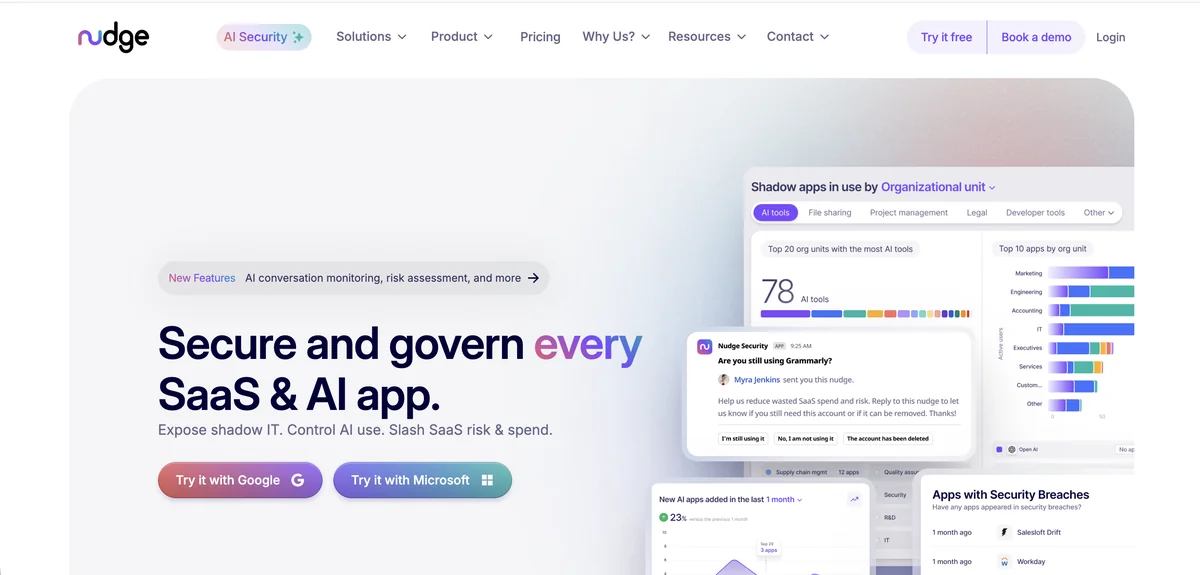
Nudge Security discovers Microsoft Teams accounts through a patented email-based approach that monitors account creation confirmations and login notifications. This method finds Teams users that traditional integrations miss, including personal Microsoft accounts employees use for work, guest accounts created outside IT oversight, and shadow Teams tenants that departments spin up independently.
The platform requires either Google Workspace or Microsoft 365 for its discovery engine to function, which works well for organizations already running Microsoft 365 since Nudge Security pulls data directly from your email system. Once connected, Nudge Security builds a complete inventory of all Teams-related accounts within about 75 minutes, including historical accounts that may have been forgotten.
Rather than forcing compliance through blocking, Nudge Security uses behavioral nudges delivered via email, Slack, or Teams itself. When the platform identifies a Teams account that needs review, it prompts the user directly to confirm whether they still need access. This approach achieves an 83% compliance rate according to the vendor, compared to 32% with traditional policy enforcement methods.
Pros:
- Discovers shadow Teams accounts and guest users that API-based tools often miss
- Full visibility in approximately 75 minutes with no agents or browser extensions required
- Supply chain breach alerts notify you when Microsoft or other vendors experience security incidents
Cons:
- Behavioral nudges are not mandatory, so users can potentially ignore review prompts
- Flat $750 monthly fee may be expensive for organizations with fewer than 150 users
- Limited presence on major review platforms makes independent validation harder
G2 Rating: 5.0 out of 5 (limited reviews)
Gartner Peer Insights: 4.7 out of 5 (22 reviews)
Lumos
Lumos positions itself as an Autonomous Identity Platform that uses AI to handle the tedious parts of Microsoft Teams access reviews. The platform’s Albus AI agent analyzes peer group access patterns and usage anomalies to automatically approve or reject routine certification decisions. Reviewers oversee these agent decisions rather than manually evaluating every Teams account, which the vendor claims completes reviews seven times faster than traditional approaches.
The platform connects to Microsoft 365 through 300+ pre-built integrations and can map every identity, account, and permission across your Teams environment. For Lumos customers, this means seeing not just who has Teams access, but understanding their entitlements relative to similar users in the organization. The AI flags outliers who have more access than peers in comparable roles, helping reviewers focus on genuine anomalies.
Delta Reviews address a common pain point with recurring Teams certifications. Instead of reviewing every user each quarter, reviewers only evaluate changes since the last review cycle. This reduces certification fatigue while maintaining compliance requirements for SOC 2, SOX, and ISO 27001.
Pros:
- Albus AI agent completes routine certifications automatically with peer group analysis
- Delta Reviews focus only on access changes, reducing quarterly review burden
- One-click audit-ready reports support multiple compliance frameworks
Cons:
- Steeper learning curve than marketing materials suggest, with teams spending weeks on configuration
- No live chat support available, which slows resolution of complex implementation issues
- Premium pricing without transparency requires sales engagement to evaluate costs
G2 Rating: 4.7 out of 5 (54 reviews)
Gartner Peer Insights: 4.7 out of 5 (47 reviews)
Saviynt
Saviynt brings enterprise-grade identity governance to Microsoft Teams through its cloud-native platform that unifies IGA and privileged access management on a single code base. The platform connects to Microsoft 365 through native integrations and can govern Teams alongside other Microsoft apps, AWS, Azure, GCP, and on-premise systems from one interface.
Saviynt brings AI-powered trust scoring to Teams access reviews that reduces approver workload by up to 75%. The platform automatically predicts correct access decisions with up to 94% accuracy using peer group insights, identifying which Teams permissions align with typical role patterns and which represent outliers worth investigating. Customers report 60% improvement in review completion times and 35% higher revocation rates compared to manual processes.
The mobile certification experience makes Saviynt practical for managers who need to complete Teams reviews on the go. Line managers can execute certifications from their phones with business-friendly descriptions that explain what each entitlement actually means, rather than presenting raw permission names that require IT interpretation.
Pros:
- Trust scoring automates low-risk decisions while flagging genuine anomalies for review
- Unified IGA and PAM on single code base eliminates need for bolt-on products
- Mobile experience lets managers complete Teams certifications without desktop access
- Four consecutive years as Gartner Peer Insights Customers Choice for IGA
Cons:
- Steep learning curve with complex backend despite user-friendly frontend interface
- Starting price around $10,000 plus implementation costs creates barriers for smaller teams
- Support quality varies, with some tickets staying open longer than customers expect
G2 Rating: 3.5 out of 5 (limited reviews)
Capterra Rating: 4.5 out of 5 (2 reviews)
Gartner Peer Insights: 4.8 out of 5 (185 reviews)
MiniOrange
MiniOrange offers an affordable entry point into Microsoft Teams access governance at $2-$3 per user monthly, making it accessible for organizations that cannot justify enterprise IGA pricing. The platform connects to Microsoft 365 through 6,000+ pre-built integrations and supports SCIM provisioning for automated user lifecycle management across Teams and other Microsoft apps.
The access governance capabilities in MiniOrange center on their Jira-based Access Governance Automation app, which routes access requests through approval workflows with granular logging for audit purposes. For Teams specifically, administrators can configure policy-based rules that determine correct approvers based on department, manager hierarchy, or project membership. Every action gets logged in exportable audit trails that support SOX, HIPAA, and ISO 27001 compliance requirements.
Where MiniOrange stands out is deploying SSO for applications that do not natively support modern protocols. Organizations running legacy systems alongside Microsoft Teams can use MiniOrange to provide unified access governance across both environments, something that pure SaaS governance tools often struggle to address.
Pros:
- Pricing at $2-$3 per user monthly makes Teams governance accessible for budget-conscious organizations
- Deployment takes hours instead of months typical of enterprise IGA implementations
- 6,000+ pre-built integrations cover Microsoft 365 plus legacy applications
Cons:
- Access review capabilities primarily require Jira Service Management integration
- Lacks sophisticated AI-driven analytics found in modern IGA platforms
- Support quality varies significantly between positive and negative customer experiences
- Minimum 10-user license requirement limits flexibility for small pilot projects
G2 Rating: 4.5 out of 5 (264 reviews)
Capterra Rating: 4.5 out of 5 (36 reviews)
For AI-powered automation, ConductorOne, Lumos, and Saviynt lead with intelligent certification agents. For shadow IT discovery, Nudge Security finds Teams accounts that other tools miss. For affordability, MiniOrange offers the lowest per-user pricing. For combined SaaS management and governance, Torii provides a unified platform approach.
How to Choose the Right Platform
Selecting a Microsoft Teams access review tool depends on your organization’s size, compliance requirements, and existing technology stack. Start by evaluating whether you need point solution governance for Teams specifically or broader SaaS management that covers your entire application portfolio.
Consider integration depth with Microsoft 365, AI automation capabilities, pricing model fit, compliance framework support, and implementation timeline when comparing vendors.
Organizations prioritizing AI-enabled shadow IT discovery should evaluate platforms like Torii that combine SaaS visibility with identity governance capabilities. The unified approach eliminates tool sprawl while providing financial governance features that help optimize Microsoft 365 licensing alongside security reviews.
For teams focused specifically on compliance automation with minimal manual intervention, AI-native platforms that use intelligent agents to handle routine certifications reduce the burden on reviewers. This works well for organizations running quarterly or annual access reviews across large Teams deployments where manual review of every account becomes impractical.
Budget-conscious organizations should weigh the total cost of ownership rather than just per-user pricing. Platforms with lower sticker prices may require more implementation effort or lack automation features that save time in the long run. Conversely, enterprise-priced solutions often include capabilities that smaller organizations never use, making mid-market options potentially better fits.
The right choice ultimately depends on balancing your compliance requirements, IT resources, and Microsoft 365 investment against each vendor’s strengths in automation, integration depth, and ongoing support quality.
Frequently Asked Questions
Start by scoping tenants and channels, sync identities via Entra ID or a third-party connector, choose a platform, run certification campaigns targeting employees and guests, use manager workflows to approve or revoke access, and export audit reports for compliance.
Access reviews reduce wasted Microsoft 365 licensing spend and limit exposure from unused or guest accounts. At $7.20–$22 per user monthly, inactive accounts can cost $86–$264 yearly; regular reviews cut unnecessary licenses and close data exposure windows.
Entra ID lists accounts and last sign-in timestamps but lacks channel-level collaboration details, meeting participation metrics, and granular guest relationships. That missing context makes it hard to decide whether a Teams license or guest membership still serves a business purpose.
For AI-driven automation, ConductorOne, Lumos, and Saviynt excel with intelligent agents that preapprove low-risk access, run delta reviews, and surface outliers. They reduce reviewer workload but differ on integration depth, pricing, and implementation timelines.
Shadow accounts and unmanaged guests can be found via email-based discovery like Nudge Security, or by combining Microsoft Graph data with SaaS discovery tools such as Torii. Use both approaches to capture personal accounts, orphaned guests, and shadow tenants.
Choose based on Microsoft 365 integration depth, AI automation, pricing model, compliance support, and implementation time. Balance license cost savings, reviewer workload reduction, and whether you need SaaS management, shadow IT discovery, or enterprise IGA features.